
4. OSH workflows and tools#
Software for hardware design#
Software tools are used for multiple task in hardware designs, either open source or not. Depending on the components of the hardware project, it may use various alternatives. A frequent one is CAD (Computer-Aided Design) software, which allows makers to model and visualize complex hardware structures before they are physically built. Simulation tools help in testing and refining designs, saving time and resources.
Software can also sometimes be used to create virtual prototypes of hardware systems. This allows for validation and verification of designs before the physical prototyping stage, reducing the risk of errors and ensuring that the hardware functions as intended. Hardware description languages (HDLs) such as Verilog and VHDL are used to model and simulate hardware behavior. This enables people to identify and fix issues in the design before manufacturing.
Unless the project has only mechanical parts, most OSH projects will require firmware, which is a specialized software that controls the functionality of embedded systems. Firmware is crucial for configuring and managing hardware components, and it is essential for ensuring that the hardware behaves correctly.
Finally, hardware projects involve collaboration among multiple parties. Software tools for version control, collaborative development, and project management are essential for coordinating efforts, tracking changes, and ensuring that everyone is working with the latest version of the design. This is particularly relevant in OSH, as we will see in this section.
Source vs Export formats#
There is currently no open toolchain for designing OSH[1]. There are multiple examples of software for CAD: AutoCAD, Solidworks, FreeCAD, OpenSCAD, are some examples. The former two are proprietary while the others are open source software. However, what matters most in OSH projects is the difference between source and export file formats produced by CAD software.
Export formats are for example STP, STL or PDF. They often can be read/interpreted by different systems and are sufficient to produce the design. However, they are usually not easily editable and just contain a snapshot of the final design.
Source files are your original design files like SVG, ODS. Unfortunately, CAD software has its own source file format. If you use open source software like FreeCAD or OpenSCAD, there will be no compatibility issues.
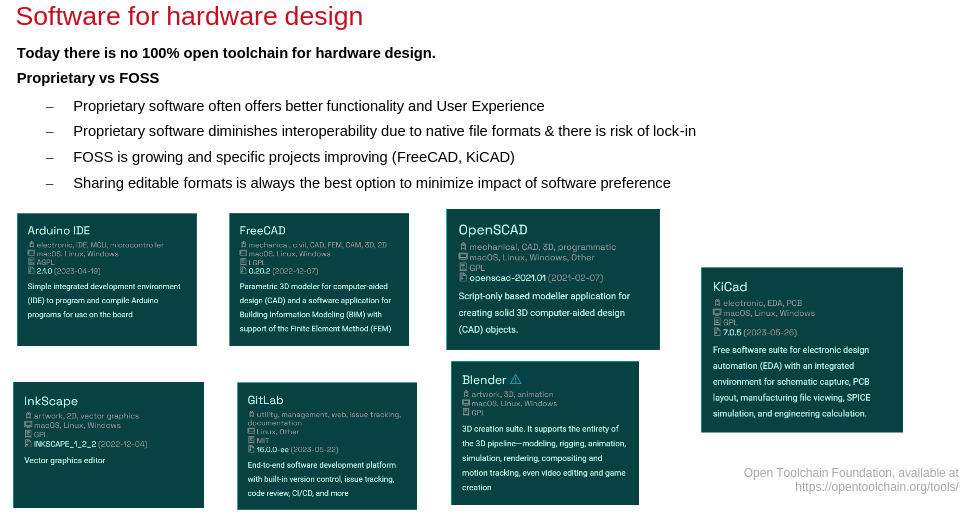
Fig. 23 FOSS for hardware design, via the Open Toolchain Foundation.#
A quick example: Let’s say you find a great design for a 3D-printed cup holder, but it just does not fit your cup. It is an open source project, and you want to contribute to it by creating a version which is compatible to your type of cup. A first step would be to download the source file, modify it, and print your new cup holder.
With the original CAD files from e.g. FreeCAD or Blender it’s just a matter of seconds to change some parameters to make it compatible. However, if just the .stl file is shared, you are lucky if you can easily import the design in your CAD program without any error or loss of information. While users might be fine with export formats, developers definitely need the source files to be able to work on the hardware design.
Version control systems#
Version control describes both the practice and the systems used for managing changes to computer programs, documents, large web sites, or other collections of digital information (Fig. 24).
Think about the times you worked in collaboration with someone, where you were both writing in the same Word document. You most likely had to take turns, so not to overwrite/redo the same part of the text the other person was working on. On top of that you had to create multiple versions of the file, so that you could keep track of the most recent changes.
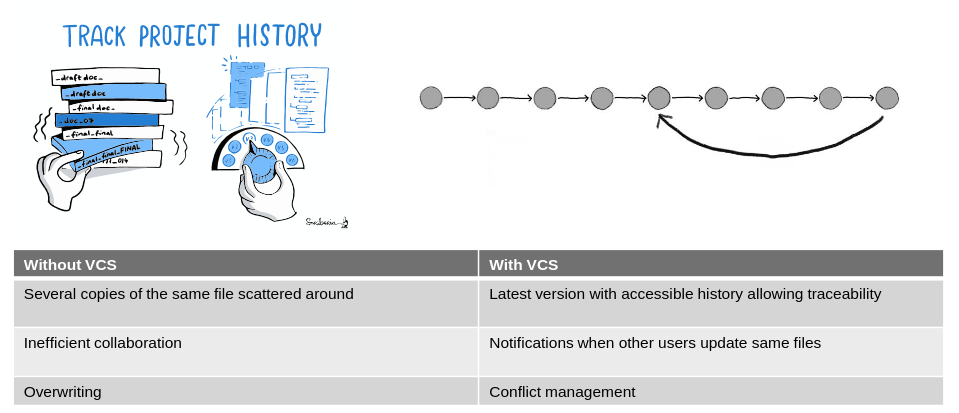
This is quite inefficient and confusing: what was the last version? Was it my turn to be working on this? What happens when two people want to change the same section multiple times? These problems multiply when teams of many people work on numerous files. This is a common situation in OSH projects, where there are files for software, for electronics, for design, and many people working simultaneously.
To address this problem, version control systems (VCS) keep track of file changes, who made them, at what time, and in which part of the file.
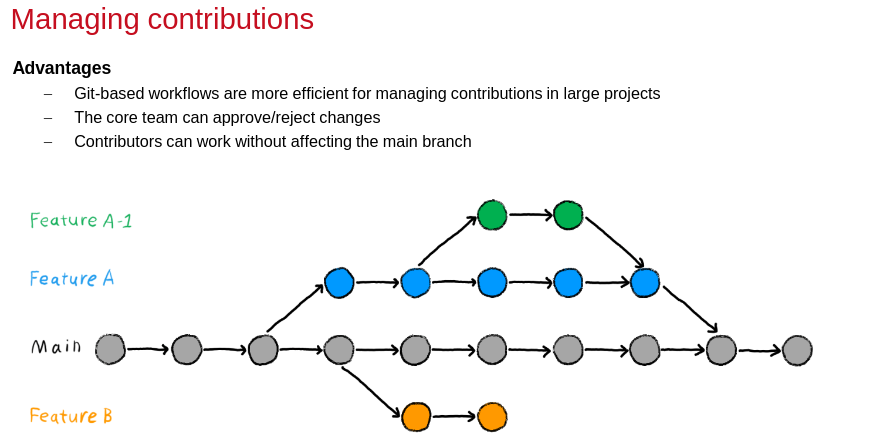
The direct benefits of using a VCS are (Fig. 25):
you don’t need several copies of the same file: VCS show you the latest version, and notify you when the portion you’re working on has been updated by someone else;
you can go “back in time” and see what changes were made and when, and also bring some changes of the past to the most recent version of your project; and
all collaborators in a project can work on it at the same time and add their changes to the project without the risk of accidentally overwriting someone else’s work.
A relevant feature of VCS systems is that they flag when two users working on the same document create a “conflict”. For example, if both you and your colleague changed the same part in a text at the same time, the VCS would flag it, indicating that someone needs to resolve the overlapping changes.
VCS workflow#
A typical procedure for using version control is as follows:
1. Create files - these may contain text, code or both.

2. Work on these files, by changing, deleting or adding new content.

3. Create a snapshot of the file status (also known as version) at this time.

4. Document what was changed in the version history of that file.
This process of creating a snapshot is described differently in different version control software. For example, Git describes it as “a commit”. Some systems call it “a time-point” or “a checkpoint”; and this is referred to as “saving your work” in other cases such as in Google docs or HackMD. The version history may be more or less informative.
As you keep saving your work by adding changes, you make more and more snapshots. You can think of these as saving versions of these files. If you need to go back to a previous version of a file because of a mistake, or if you changed your mind about a previous update, you can access the file in your preferred version, or return your entire project to a past state.
In many version control systems (or in a special document if you do manual version control), the user can add a comment for each snapshot. Clear and concise comments make it easier to get a fast overview of the changes that were made in each version. This ensures that it is easy to find what you are looking for when you need to go back to a past version.
Managing contributions#
OSH projects are often composed by a small developer group who maintains the project and works on the agreed roadmap, and a broader layer of contributors. These will often propose changes to improve the project, that the developer team will “inspect” and approve or not to merge into the main project files.
Let’s say a contributor wants to add a portion of code that changes a current “beep” sound in a device to an intermittent sound. At first, the contributor will develop this feature without reflecting the changes in the central repository. Advanced VCS allow this via the “branching” feature. A branch creates a local copy of the main repository, so people can work and try new changes.
Any work done on your branch will not be reflected on the main project (referred to as your main branch) so it remains secure and error-free. At the same time, people can test their ideas and troubleshoot in a local branch. When the contributor is happy with the new changes, they can request the developer team to check it. If they approve it, they will use the “merge” feature, which integrates independent changes into the main branch.
You can have more than one branch off of your main copy. If one of your branches ends up not working, you can either abandon it or delete it without impacting the main branch of your project.
Software implementations of VCS#
Different version control systems can be used through a program with a graphical user interface, web browser-based applications, or command-line tools. Tools such as Google Drive and Dropbox offer platforms to update files and share them with others in real-time, collaboratively.
More sophisticated version control system exists within tools like Google docs or HackMD. These allow collaborators to update files while storing each version in its version history.
Advanced version control systems (VCS) such as Git, Mercurial, and SVN provide much more powerful tools. Accessing the version history and keeping control over the main version of your files are particular feature of these advanced tools (Fig. 26).
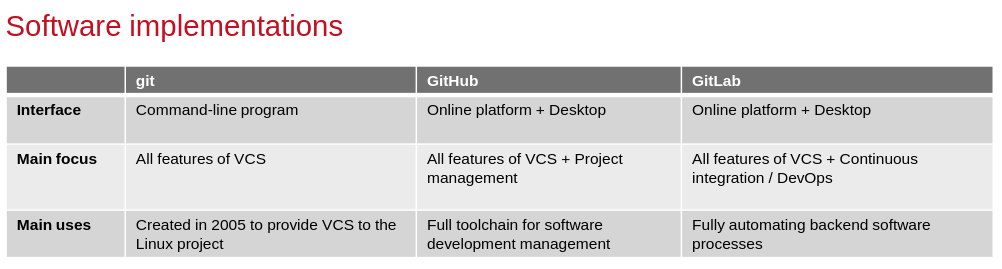
Git is a successful version control software created in 2005. It got rapidly adopted by software developers because it is very fast and scalable. Its functions allow for parallel development and maintenance of large projects, like Linux development.
While developed for software, Git has been used for many different kinds of projects and platforms. Git can be used directly from a computer terminal, but probably the most popular git implementations are GitHub and GitLab. These platforms brought project management tools into the Git workflow, facilitating community building around projects.
GitHub is a cloud service for remote hosting of git repositories. In addition to hosting your code, the site helps manage software development projects with features like issue tracking, collaborating with other GitHub users, and hosting web pages. GitHub offers free services for open source projects (accessible to the public) and paid tiers for private projects. For public projects, anyone can see code you push to GitHub and offer suggestions, or even code, to improve your project. GitHub currently hosts the source code for tens of thousands of open source projects, but is not alone. BitBucket and GitLab.com offer comparable services.
While GitHub is a collaboration platform that helps review and manage codes remotely, GitLab is majorly focused on DevOps and continuous improvement / development (CI/CD). GitHub is more popular amongst developers as it holds millions of repositories, but recently GitLab has been gaining popularity, as the company continues to add new features to make it more competitive and user-friendly.
The fact that it is open source is also a big plus as it allows self-hosting. Some institutions and sometimes people choose to run “self-hosted” instances GitLab. Self-hosting means you use your own resources (a server) to host and run applications instead of renting the services from the platforms. The benefit of self-hosting is that the user has complete control over their data, at a potentially lower monthly cost. The downside is that the user is responsible for maintaining the service. If the service encounters an error, the user is responsible for resolving the issue.
Limitations of VCS#
Git works best with small text files. It starts to be impracticable when too many files are present, or when the repository becomes too big (1 TB is about the limit). As a Git repository stores every version of every file that is added to it, large files that undergo regular modifications can inflate the size of a project significantly. This can be problematic for research projects, where datasets often contain thousands of files and/or contain (very) large files. Also, single design files can quickly become hundreds of megabites large. Today, this can only be managed by proprietary PLM systems or collaborative CAD suites.
Interactive tutorials for familiarising yourself with GitHub can be found at https://lab.github.com/.
Slides for download#
Link to slides